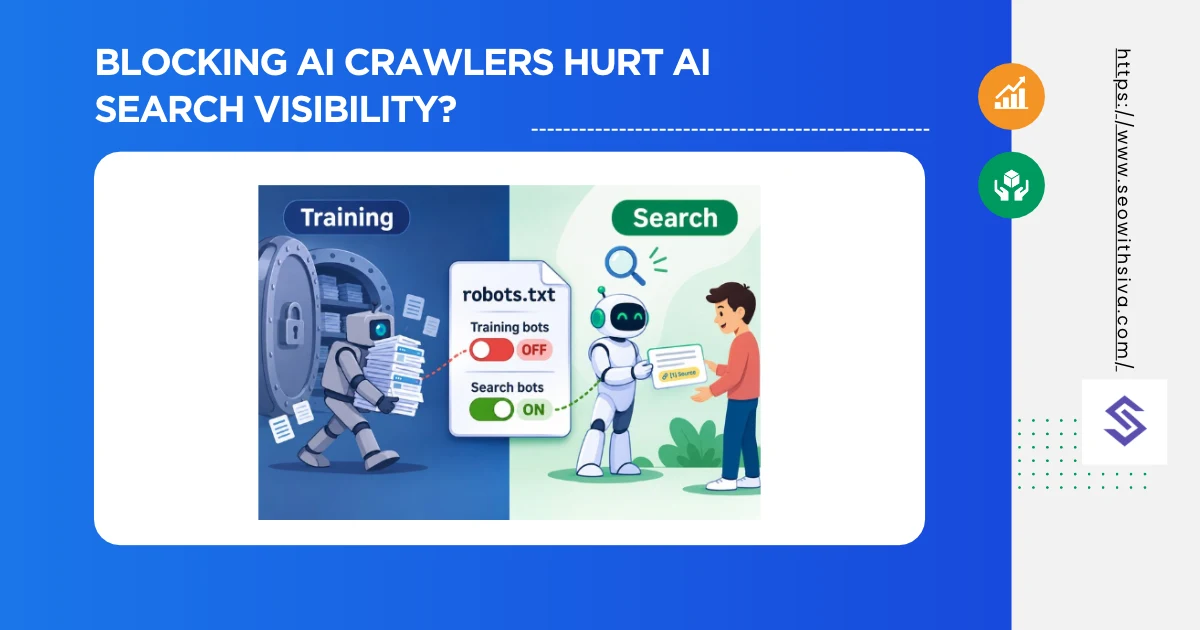
It depends entirely on which crawler you block. Every major AI company now runs separate bots for separate jobs. Block the training bot, and you mostly keep your citations. Block the search bot, and you disappear from that platform’s answers.
Blocking training crawlers (GPTBot, ClaudeBot, Google-Extended, Applebot-Extended) does not remove you from AI search answers. Blocking search/retrieval crawlers (OAI-SearchBot, Claude-SearchBot, PerplexityBot) does.
Google’s AI Overviews and AI Mode aren’t controlled by any AI-specific robots.txt token at all; they use Googlebot plus a separate Search Console setting.
Why “AI Crawler” Is the Wrong Unit?
Treating “AI crawlers” as one category is the root of most mistakes. AI companies now split their bots into three jobs:
| Job | What it does | Effect of blocking |
|---|---|---|
| Training | Collects content to train future models | Opts you out of future training data; doesn’t remove you from live AI search |
| Search/retrieval | Builds the index an assistant searches when answering live questions | Removes you from that platform’s cited answers |
| User-initiated fetch | Fetches one page because a user asked about it | Mixed: some vendors say robots.txt may not apply |
Your AI search visibility lives almost entirely in the second row. That’s the one people block by accident.
What Each Platform’s Crawlers Do?
The Complete Cost Table
| Token | Owner | Job | Block it and you lose… |
|---|---|---|---|
| GPTBot | OpenAI | Training | Future OpenAI training use only |
| OAI-SearchBot | OpenAI | Search | ChatGPT search citations |
| ChatGPT-User | OpenAI | User fetch | Uncertain; robots.txt may not apply |
| ClaudeBot | Anthropic | Training | Future Anthropic training use only |
| Claude-SearchBot | Anthropic | Search | Visibility in Claude search answers |
| Claude-User | Anthropic | User fetch | Claude fetching your page for users |
| PerplexityBot | Perplexity | Search | Perplexity citations |
| Perplexity-User | Perplexity | User fetch | Little; generally ignores robots.txt |
| Google-Extended | Training + Gemini grounding | Gemini app/Vertex grounding; not AI Overviews | |
| Googlebot | Search | All of Google Search, incl. AI Overviews | |
| Bingbot | Microsoft | Search | Bing Search and Copilot answers |
| Applebot-Extended | Apple | Training | Future Apple training use only |
OpenAI (ChatGPT)
OpenAI runs three user agents, and its documentation states that each robots.txt setting is independent.
- GPTBot: Training. Blocking it tells OpenAI not to use your content to train its models.
- OAI-SearchBot: Powers ChatGPT search. OpenAI says sites that block it won’t appear in ChatGPT search answers, though they can still show up as navigational links.
- ChatGPT-User: Fetches pages for user actions in ChatGPT and custom GPTs. OpenAI notes that because these requests are user-initiated, robots.txt rules may not apply.
OpenAI says robots.txt changes take about 24 hours to affect search results.
Bottom line: Block GPTBot if you want to opt out of training. Never block OAI-SearchBot if you want ChatGPT citations.
Anthropic (Claude)
Anthropic follows the same three-way split:
- ClaudeBot: Training. Blocking it signals that your future content should be excluded from model training.
- Claude-SearchBot: Indexes content to improve search answers. Anthropic says blocking it may reduce your visibility in Claude’s search results.
- Claude-User: Fetches pages when a user asks Claude a question. Blocking it may reduce visibility for user-directed web search.
Anthropic says its bots honor robots.txt and supports the non-standard Crawl-delay directive. It also warns that blocking by IP may not work reliably because it stops the bot reading your robots.txt.
Watch for stale rules: Older robots.txt files often reference anthropic-ai or Claude-Web. Those tokens are outdated and don’t control the current bots.
Perplexity
- PerplexityBot: Builds Perplexity’s search index. Perplexity recommends allowing it if you want to appear in results.
- Perplexity-User: Fetches pages for live user questions. Perplexity’s documentation says this agent generally ignores robots.txt, because the fetch is user-initiated.
Perplexity says neither bot is used for model training, so there’s no training-only token to block. Blocking PerplexityBot is purely a visibility decision.
Google (AI Overviews, AI Mode, Gemini)
Google is where most confusion lives.
- Google-Extended isn’t a separate crawler; it’s a robots.txt control token. It governs whether Google can use your content to train Gemini models and to ground answers in the Gemini app and Vertex AI. It does not affect AI Overviews or AI Mode, and it isn’t a Search ranking signal.
- Googlebot crawls for Search, including AI Overviews and AI Mode. Blocking Googlebot removes you from Google Search entirely, so it’s never the right lever for AI-only decisions.
- Search generative AI control (Search Console): Google launched this in June 2026 and finished rolling it out globally on August 31, 2026. It’s a property-level setting under Settings → Search generative AI that removes your content from AI Overviews, AI Mode, and AI features in Discover. The default is Include. Google says opting out isn’t used as a ranking signal for regular Search.
Bottom line: Blocking Google-Extended costs you nothing in AI Overviews. The only way to leave AI Overviews without leaving Search is the Search Console setting (or snippet controls like nosnippet, which also shrink your regular snippets).
Microsoft (Bing and Copilot)
Copilot grounds its answers in Bing’s index, so Bingbot access is what matters for Copilot visibility. Blocking Bingbot to “block AI” removes you from Bing Search too.
Apple
Applebot powers Siri and Spotlight suggestions. Applebot-Extended is a training control token, similar to Google-Extended. Blocking Applebot-Extended doesn’t affect Applebot’s crawling.
The Hidden Way You’re Probably Blocking AI Crawlers
Your robots.txt may be fine while your CDN blocks the bots anyway.
Cloudflare’s 2026 defaults
On July 1, 2026, Cloudflare replaced its single “Block AI bots” switch with three categories: Search, Agent, and Training. From September 15, 2026, new domains, new sites on existing accounts, and Free-tier accounts that haven’t changed their settings block Training and Agent crawlers by default on pages that show ads. Search crawlers stay allowed.
What to check
- Open your CDN or WAF bot settings (Cloudflare Security → Bots / AI Crawl Control, Akamai, Fastly, Sucuri)
- Confirm the Search category is allowed and that Training blocks aren’t catching Googlebot or Bingbot
- Check server logs for 403 responses to OAI-SearchBot, Claude-SearchBot, and PerplexityBot
- Test with a request that uses the bot’s user-agent string, but remember some WAFs also check the source IP
curl -s -o /dev/null -w "%{http_code}\n" \
  -A "Mozilla/5.0 AppleWebKit/537.36 (KHTML, like Gecko); compatible; OAI-SearchBot/1.4; +https://openai.com/searchbot" \
  https://www.example.com/
A 403 or a challenge page here means something upstream is overriding your robots.txt.
Three robots.txt Setups for Three Goals
Goal 1: Maximum AI visibility
Allow everything. Simplest setup for brands that want to be cited everywhere.
User-agent: *
Allow: /
Disallow: /admin/
Disallow: /cart/

Sitemap: https://www.example.com/sitemap.xml
Goal 2: Stay citable, opt out of training (most common)
# Training opt-outs
User-agent: GPTBot
Disallow: /

User-agent: ClaudeBot
Disallow: /

User-agent: Google-Extended
Disallow: /

User-agent: Applebot-Extended
Disallow: /

User-agent: CCBot
Disallow: /

# Search and retrieval: keep allowed
User-agent: OAI-SearchBot
Allow: /

User-agent: Claude-SearchBot
Allow: /

User-agent: PerplexityBot
Allow: /

User-agent: *
Allow: /
Disallow: /admin/

Sitemap: https://www.example.com/sitemap.xml
Goal 3: Exit AI answers entirely
Block the search and user-fetch tokens for each vendor, and turn the Search generative AI control to Exclude in Search Console. Accept that user-initiated fetchers from some vendors may still request pages, and that you’ll lose a growing referral channel.
So Should You Block AI Crawlers?
There’s no single right answer, but the trade-off is clearer than most debates suggest. For how Google’s AI features use Googlebot and the Search Console control, see how to optimize for AI Overviews and AI Mode.
Reasons to block training crawlers:
- You sell content, data, or research that loses value if it’s absorbed into a model
- You’re a publisher negotiating licensing deals
- Your legal team requires an opt-out
Reasons to keep training crawlers allowed:
- Brand and product facts in training data can shape how models describe you even when they don’t search the web
- You run a lead-gen, SaaS, or e-commerce site where being mentioned matters more than protecting the text
Reasons to keep search crawlers allowed (almost everyone):
- AI answers increasingly cite and link sources, and those citations are a growing referral channel
- If you block them, AI assistants will cite your competitors on the same questions
For most businesses, Goal 2 is the sensible default: opt out of training if you want to, and keep every search and retrieval crawler allowed.
Conclusion
Blocking AI crawlers doesn’t hurt your AI search visibility on its own. Blocking the wrong AI crawlers does. Training bots and search bots are separate switches, Google’s AI Overviews follow neither, and your CDN may be overriding all of it. For the full set of technical checks, see technical SEO checks.
This week, do three things:
- read your robots.txt against the cost table above,
- check your CDN’s AI bot settings for an accidental Training block,
- and search your server logs for 403s served to OAI-SearchBot, Claude-SearchBot, and PerplexityBot.

FAQ
Can AI crawlers ignore robots.txt?
Some can. robots.txt is a voluntary standard. OpenAI says robots.txt may not apply to user-initiated ChatGPT-User fetches, and Perplexity says Perplexity-User generally ignores it. Blocking at the CDN or WAF level is the only enforceable control.
How long does it take for robots.txt changes to take effect?
OpenAI and Perplexity both say about 24 hours. Other vendors don’t publish a figure. Re-check your server logs a few days after any change.
Will blocking AI crawlers improve my Google rankings?
No. Google says Google-Extended and the Search generative AI control aren’t ranking signals for regular Search. Blocking AI crawlers can, however, reduce server load if aggressive bots were slowing your site.