What Is Crawl Budget?
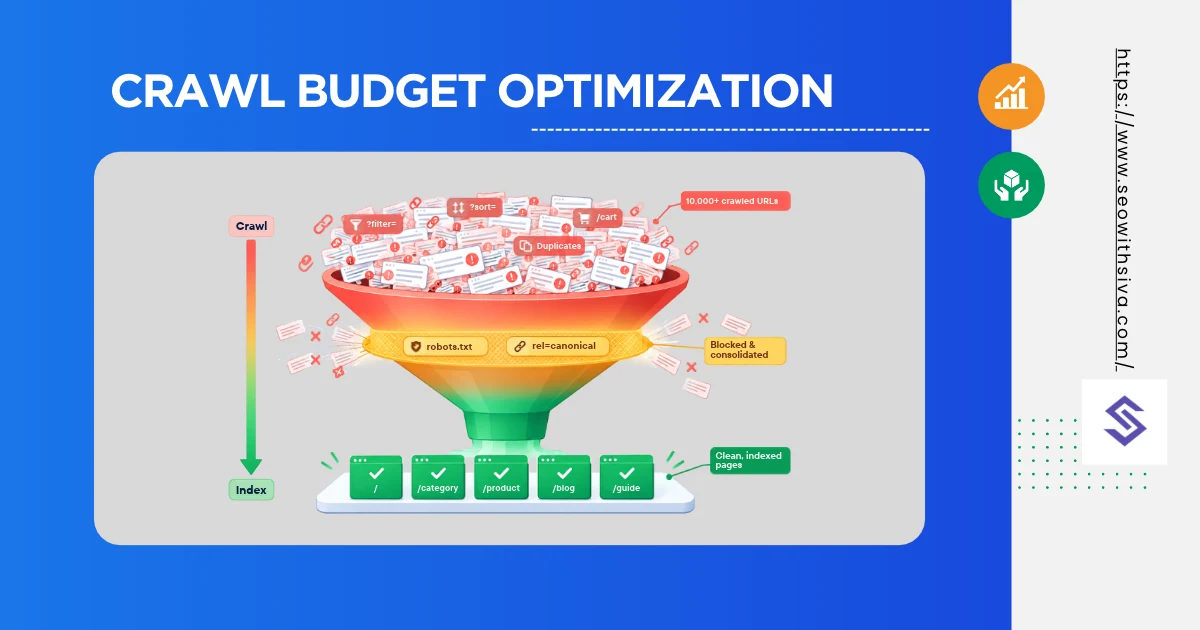
Crawl budget is the set of URLs Google can and wants to crawl on your site. It’s driven by crawl capacity (how much your server can handle) and crawl demand (how much Google wants your content).
To optimize it: remove or block low-value URLs (faceted filters, action parameters), return 404/410 for dead pages, fix soft 404s and redirect chains, support 304 Not Modified responses, keep sitemaps clean, and keep your server fast and error-free.
Google can’t crawl every URL on the web, so it rations how much time and server load it spends on each site. That allocation is your crawl budget. Google treats each hostname as a separate site, so www.example.com and shop.example.com have separate budgets.
Crawl budget is made of two parts.
Crawl capacity limit (what your server can handle)
Google calls this the crawl capacity limit, also known as hostload. It caps how many parallel connections Googlebot opens and for how long, so it doesn’t overload your server.
- Goes up when your server responds quickly and consistently (stable latency and Time to First Byte).
- Goes down when responses slow, or when your server returns 5xx errors or 429 (Too Many Requests).
Google’s July 2026 documentation update clarified that every site starts with the same conservative capacity limit, which rises over time if there’s demand and the site stays healthy. New or migrated sites don’t get a big budget on day one; they have to earn it.
The capacity limit is also shared across all Google crawlers, including those for Shopping, Images, and other Google products. Heavy crawling from one can reduce what’s left for Googlebot’s Search crawl.
Crawl demand (what Google wants to crawl)
Demand depends on how popular and valuable your URLs are, and how stale Google’s copy has become. Site-wide events like a domain migration temporarily raise demand.
Put together: crawl budget = the URLs Google can and wants to crawl. A fast server doesn’t help if demand is low, and high demand doesn’t help if your server can’t keep up.
Do You Actually Need Crawl Budget Optimization?
Google’s guide says it’s mainly written for three kinds of sites:
| Site type | Rough threshold |
|---|---|
| Large sites | 1 million+ unique pages, content changing about weekly |
| Medium sites with fast churn | 10,000+ unique pages, content changing daily |
| Sites with indexing backlogs | A large share of URLs stuck in “Discovered - currently not indexed” |
Google stresses these are rough estimates, not hard cutoffs. If your new pages are usually crawled the same day they’re published, you don’t need this guide. For you, a clean sitemap and a regular check of the Page Indexing report is enough.
Signs you have a crawl budget problem
- New or updated pages take days or weeks to show up in Google
- Search Console’s Crawl stats show most requests going to parameter URLs, not your real pages
- A growing pile of URLs under “Discovered - currently not indexed”
- Server logs show Googlebot repeatedly hitting filters, sort orders, or session IDs
- Crawl requests drop sharply after server slowdowns or error spikes
How to Diagnose Crawl Waste?
You can’t optimize what you can’t see. Use three sources together.
1. Search Console Crawl Stats
Go to Settings → Crawl stats. Check:
- Total crawl requests and trend over 90 days (export it; Search Console only keeps 90 days)
- By response: a high share of 301s, 404s, or 5xx is a red flag
- By purpose: Discovery vs Refresh. Low discovery on a growing site suggests Google isn’t finding new URLs efficiently
- Host status: any robots.txt fetch, DNS, or server connectivity failures
2. Server log file analysis
Logs show exactly what Googlebot requested, not just what Google chooses to report. This Python script groups Googlebot hits by URL pattern so you can see where budget goes:
import re
from collections import Counter

LOG_FILE = "access.log"
pattern = re.compile(r'"GET (\S+) HTTP/[\d.]+" (\d{3}) .*Googlebot')

buckets = Counter()
statuses = Counter()

with open(LOG_FILE, encoding="utf-8", errors="ignore") as f:
    for line in f:
        m = pattern.search(line)
        if not m:
            continue
        url, status = m.groups()
        statuses[status] += 1
        if "?" in url:
            params = sorted(p.split("=")[0] for p in url.split("?", 1)[1].split("&"))
            buckets["?" + "&".join(params)] += 1
        else:
            buckets["/" + url.strip("/").split("/")[0]] += 1

total = sum(buckets.values())
print(f"Total Googlebot hits: {total}\n")
for key, count in buckets.most_common(20):
    print(f"{count:>8}  {count/total:6.1%}  {key}")
print("\nStatus codes:", dict(statuses))
If ?color&size&sort is eating 40% of hits while your product pages get 10%, you’ve found your leak.
Verify it’s really Googlebot. Fake Googlebot user agents are common. Confirm with a reverse DNS lookup (the host should end in googlebot.com or google.com) or check the IP against Google’s published crawler IP ranges.
3. A full site crawl
Run Screaming Frog or a similar crawler to find redirect chains, soft 404s, duplicate URLs, orphan pages, and parameter variants. Compare the URL count it discovers with the number of pages you actually want indexed. A big gap usually means URL bloat.
Crawl Budget Optimization: 10 Fixes That Work
These are ordered roughly by impact for most large sites.
1. Control faceted navigation and action parameters
Faceted navigation is one of the biggest sources of crawl waste. Google’s Search Relations team named faceted navigation and “action parameters” (add-to-cart, wishlist, compare links) as top crawl problems in its review of 2025 crawl issues. A product listing with 10 filters can produce millions of combinations.
Block the combinations that have no search value:
User-agent: *
# Action URLs that change state
Disallow: /*?*add-to-cart=
Disallow: /*?*wishlist=
Disallow: /*?*compare=

# Low-value sort and multi-filter combinations
Disallow: /*?*sort=
Disallow: /*?*price_min=
Disallow: /*?*sessionid=
Keep crawlable only the filter pages people actually search for (for example, /shoes/running/ as a clean static URL) and link to those directly.
2. Consolidate duplicate content
Pick one URL per piece of content. Use 301 redirects for true duplicates and canonical tags for close variants. Google’s goal, in its own words, is to crawl unique content, not unique URLs.
3. Return 404 or 410 for pages that are gone
A 404 is a strong signal not to crawl that URL again. Don’t redirect every dead URL to the homepage; that creates soft 404s. Google also notes that 4xx responses (except 429) don’t waste crawl budget, so a clean 404 is fine.
4. Eliminate soft 404s
A soft 404 is a “not found” or empty page that returns 200 OK, such as an empty category or an out-of-stock page with no content. Google keeps recrawling these. Find them in the Page Indexing report and either add real content or return a proper 404/410.
5. Fix redirect chains (302)
Every hop is a separate request. Collapse A → B → C → D into A → D, and update internal links to point straight to the final URL.
6. Support 304 Not Modified
If a page hasn’t changed since Googlebot’s last visit, your server can return 304 Not Modified with no body. Googlebot reuses its cached copy, and your server saves bandwidth. Make sure your server honors the If-Modified-Since request header and sends accurate Last-Modified or ETag headers.
curl -sI -H "If-Modified-Since: Wed, 01 Oct 2026 00:00:00 GMT" https://www.example.com/page/
# Look for: HTTP/2 304
7. Make your server fast and stable
Since capacity rises with crawl health, server speed directly raises your ceiling. Watch TTFB, slow database queries on large listing pages, and 5xx spikes during traffic peaks. If URL Inspection shows “Host load exceeded,” you need more server resources.
8. Keep XML sitemaps clean and accurate
Only include indexable, canonical, 200-status URLs, and use accurate <lastmod> dates for updated content. Don’t resubmit an unchanged sitemap several times a day, and don’t list URLs you don’t want in search.
9. Trim rendering resources
CSS, JavaScript, and XHR/API calls fetched during rendering use the same crawl budget. Google’s renderer caches resources for up to 30 days, so:
- Use fewer, bundled resources where practical
- Avoid cache-busting parameters that change on every deploy unless the file content actually changed
- Don’t let rendering trigger dozens of API calls per page
10. Make sure mobile pages carry all the links
Google crawls mostly with its smartphone crawler. If your mobile HTML drops links that exist on desktop (mega menus, footer links, pagination), Google discovers new pages more slowly.
Crawl Budget Myths to Stop Believing
| Myth | Reality |
|---|---|
| “Use noindex to save crawl budget.” | Google still has to fetch the page to see the noindex, so it doesn’t save crawling in the short term. Use robots.txt to stop crawling. |
| “Block sections in robots.txt temporarily to push budget elsewhere,” | Google says not to. Freed budget only moves to other pages if Google is already hitting your capacity limit. |
| “Rotate sitemaps to steer Googlebot.” | Sitemaps are suggestions, not commands. Rotating them doesn’t reallocate budget. |
| “404s waste crawl budget.” | 4xx responses (except 429) don’t waste budget. Soft 404s do. |
| “A faster server means more crawling.” | Only if Google wants more of your content. Making low-quality pages faster doesn’t raise demand. |
| “Small sites need crawl budget optimization.” | Usually not. Under ~10,000 pages with normal update rates, focus on content and internal links. |
What About AI Crawlers?
GPTBot, OAI-SearchBot, ClaudeBot, PerplexityBot, and others don’t use Google’s crawl budget, but they do use your server’s capacity. If aggressive bots slow your server, Google’s crawl health signals drop too, and Googlebot crawls less. For which AI bots to allow or block, see does blocking AI crawlers hurt AI search visibility?.
- Check logs for non-Google bot volume and verify bots against their published IP ranges
- Block training crawlers you don’t want, and rate-limit at the CDN rather than letting them overload the origin
- Don’t block AI search/retrieval bots by accident if you want visibility in AI answers
Conclusion
For the wider audit these checks belong to, see technical SEO checks.
- Most sites don’t have a crawl budget problem; they have a crawl waste problem. Before trying to get Google to crawl more, make sure it isn’t spending its visits on sort orders, cart links, soft 404s, and redirect chains.
- Start with three steps this week: export your Crawl stats baseline, run the log script above to see where Googlebot actually spends its time, and block the biggest parameter pattern that has no search value. Then measure again in 30 days.

FAQ
What is crawl budget in SEO?
Crawl budget is the number of URLs Google can and wants to crawl on your site in a given period. It’s determined by your crawl capacity limit (how much load your server handles) and crawl demand (how much Google wants to crawl your content).
Does crawl budget affect small websites?
Rarely. Google’s crawl budget guide is aimed at sites with 1 million+ pages, or 10,000+ pages that change daily. If your pages are usually crawled within a day of publishing, crawl budget isn’t your bottleneck.
How do I check my crawl budget?
Open Google Search Console, go to Settings → Crawl stats. It shows total crawl requests, response codes, file types, and host status for the last 90 days. Server logs give a more complete picture of exactly which URLs Googlebot requests.
Does noindex save crawl budget?
Not directly. Googlebot still has to request the page to see the noindex tag. Over time, Google may crawl noindexed pages less often, but to stop crawling a URL, block it in robots.txt.